
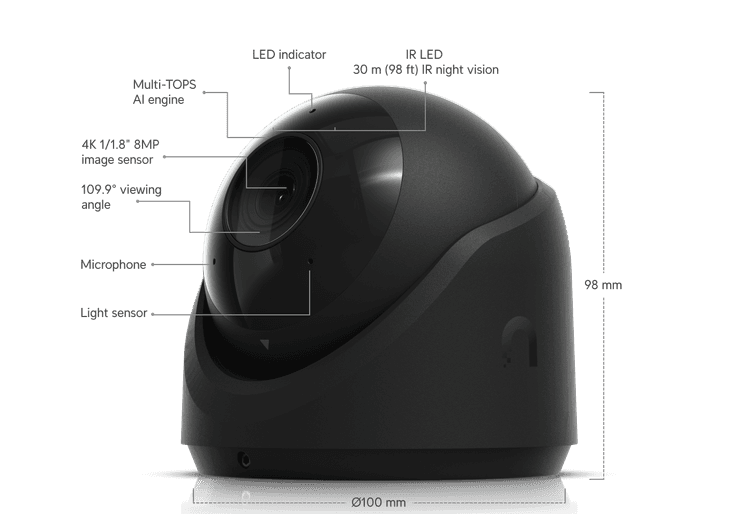
Entrances and exterior doors
Ubiquiti G6 Turret
A 4K turret camera for a focused view of the places people come and go.

Intelecyn 360 brings physical-security tools together for your business, with options for camera coverage, recorded video and remote viewing. Start with a site survey so we can plan around your building and operations.
Video
Footage
Camera Coverage
RTC Support

Watch how RTC's security team monitors and responds to threats in real time
Coming Soon
Real-time threat detection across our global security mesh. Every connection inspected, every anomaly contained before it reaches your business.
Security Mesh — Live
Camera coverage for the places that matter, with recording and viewing options selected for your business.
Next-generation firewall-as-a-service with deep packet inspection, application control, and 24/7 SOC management. Full lifecycle management included.
Indoor and outdoor camera options tailored to your property, with the right views of the areas that matter most.
Always-on volumetric attack protection with sub-second detection and automatic traffic scrubbing. Up to 10 Tbps mitigation capacity.
AI-powered security event correlation, automated alerting, and compliance reporting — all managed by our 24/7 local security operations team.
Review recorded footage when you need it. We’ll help select recorder and storage options around your cameras and your business.
Secure software-defined WAN with encrypted tunnels, traffic segmentation, and integrated threat prevention at every network edge.

AI-powered cameras and video analytics — managed from one app
Coming Soon
We work with multiple best-in-class vendors to ensure your business gets exactly the right solution — not the one we have on a shelf. Our 360° assessment looks at every angle of your environment before we recommend anything.
Security Assessment
Complimentary · No Obligation
We assess your entire environment — physical, network, and cloud — then recommend the best-fit solution from the vendors that make the most sense for your business. No brand bias. No one-size-fits-all. Full circle.
Security specialists available 24/7 · 812-486-3211
The Difference Is Who Answers
Your people, inventory and everyday work deserve a clearer view. Visible cameras can help discourage theft and vandalism, and recorded footage gives you a way to see what happened when questions come up.
With authorized remote viewing, you can check in on your locations when you’re away. Your local Intelecyn team will walk the property with you and help plan coverage around the places that matter most.
Talk with an Intelecyn Team Member

THE ESSENTIALS
Keep important areas in view, review recorded events and check in from a supported phone or computer.
RTC carries Ubiquiti and Verkada for Intelecyn 360. Our local team can help you choose a system that fits your property and how you work.


Indoor and outdoor cameras can help you watch entrances, parking areas, equipment, inventory, and other appropriate spaces. Placement, lighting, image quality, and weather exposure all shape the right coverage plan.
Video recording makes it possible to review events after the fact, build a clearer timeline, and save relevant clips when supported. Recording length depends on storage, settings, and the selected solution.
With a compatible system, internet access, and appropriate permissions, authorized people can view cameras from a supported phone or computer. Intelecyn can help you plan who should have access to which locations.
Depending on the equipment and configuration, activity notifications can prompt you to check a camera view or recording. Automated alerts and self-monitoring are not the same as staffed 24/7 monitoring or emergency dispatch, which are not included unless expressly arranged.
These Ubiquiti and Verkada products are examples of what your security system could include. Your account executive and our field team will walk the site with you and recommend equipment based on your layout, priorities, and how your team works.
Entrances and exterior doors
A 4K turret camera for a focused view of the places people come and go.
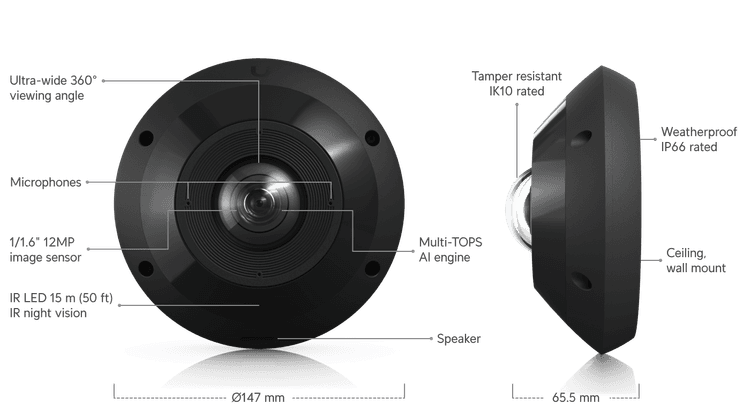
Wide-area coverage
A panoramic camera that can give your team a broad view of an open floor or shared space.

Indoor video
A 4K indoor dome camera for reviewing activity at registers, in lobbies, or along hallways.

Visitor entry
See and speak with visitors at the door, with a keypad for managed entry.
Explore camera coverage in a sample store—from the front door to the parking lot.
Illustrative sample only. Camera models, coverage estimates, and visual identification capabilities depend on real-world lighting, mounting, equipment, placement, and site validation. This is not a proposal or a guarantee of performance.

EVERYDAY BUSINESS QUESTIONS
A useful camera view can help answer more than security questions.
Coverage and recording length depend on placement, lighting, equipment and storage.
PLAN THE RIGHT SOLUTION
You don’t have to choose equipment first. Start with what you need to protect, what you want to see, and how you want to receive alerts or review activity.
Your Intelecyn Delivered by RTC account executive and field site survey crew will meet with your team for a site survey and walkthrough. Together, we’ll discuss your priorities, review the property and plan camera placement and viewing angles to cover all bases—capturing exactly what you need, and nothing you don’t.
Remote-capable systems allow authorized users to view footage through a supported app or browser. Remote viewing depends on the selected equipment, software, permissions, and internet connectivity. We’ll explain what is included in your solution.
Retention varies by camera or recorder capacity, recording settings, and the selected service or license. Choose a timeframe that gives your business enough time to discover and investigate an incident. We’ll discuss retention and how to save important clips before routine footage is overwritten.
Supported systems let authorized users export or share relevant footage for an internal review or an incident report. Confirm the available options during your assessment, and decide who is allowed to save or share recordings.
Give access to the people who need it for their role. Decide who may view live video, review recordings, or share clips. Camera placement and your workplace recording practices should respect private areas and the people who use your property.
Recording and remote viewing are different from a staffed monitoring service. Camera recording, motion alerts, and remote viewing do not automatically mean someone is watching around the clock. Any staffed monitoring, response, or dispatch services must be specifically confirmed in your proposal.
The number and type of cameras, indoor or outdoor placement, cabling, installation conditions, storage, software licensing, and number of locations all affect a quote. Intelecyn starts with your priorities and property so the recommendation fits your needs.
Tell us what matters at your property, where you want better visibility, and how you would like to review activity or receive alerts. Intelecyn can help you explore camera and monitoring options suited to your needs.
Talk with an Intelecyn Team MemberSuggested pages
Intelecyn™ 360 is physical security for your business. It brings together cameras, recorded video and remote viewing so you can see what’s happening and review what happened when it matters.
Your Intelecyn account executive and field team walk the property with you. Together, you’ll identify the areas that matter most and plan what you need to see, record and manage at each location.